
Utility Classes
Working with PDFs has one big advantage over the web: We are dealing with fixed viewport sizes. That means we don't have to think about responsiveness or breakpoints etc. which means that we can often just apply font sizes, margins and paddings directly to the elements that we are placing on our document.
RockPdf comes with many handy utility classes that make styling your PDFs a breeze. If you know TailwindCSS this might look and feel very familiar to you 😉
Example
<h1>Hello World</h1>

<div class="bg-muted p10 mt5 r3 text-center f20 font-bold">
  RockPdf rocks!
</div>

<p class="mt2 bg-primary white p5 font-bold f20 text-center r3 mx20">
  www.baumrock.com
</p>

<p class="mt5 text-center">
  <a href=# class="text-bold">Default link color</a>
</p>
Setting Variables
As you can see in the example above we use the bg-primary class for the second element. In my case this is my company color #00bb86 but in your case this will likely be seomthing different.
The utility classes come with two customizable variables and it's easy to change them:
/** @var RockPdf $pdf */
$pdf = $modules->get('RockPdf');
$pdf
  ->setLessVars([
    'col-muted' => 'orange',
    'col-primary' => 'blue',
  ])
  ->load("/site/test.php")
  ->save(preview: true);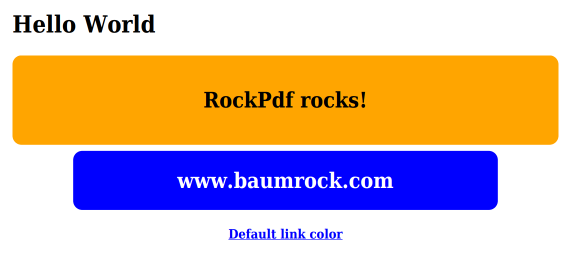
Note that not only the blue background changed but also the color of the link below!
Reference
RockPdf will load /site/modules/RockPdf/styles/reset.less and /site/modules/RockPdf/styles/utils.less before the actual document stylesheet (if you are using one).
The utils.less file creates utility classes from an array of values from 0 to 100 that you can apply to your elements in the document. The most important classes are:
margins
- m0..100: margin on all sides
- mt0..100: margin-top
- mr0..100: margin-right
- mb0..100: margin-bottom
- ml0..100: margin-left
- m-auto, ml-auto, mr-auto
- mx0..100: margin left&right
- my0..100: margin top&bottom
Example: mt5 means margin-top: 5mm;
paddings
- same as above with letter
p
Example: p10 means padding: 10mm;, py5 means padding-left: 5mm; padding-right: 5mm;
text
- alignment: text-left, text-center, text-right, text-justify
- decoration: text-underline, text-line (for line-through), text-none
text-boldas alias for font-boldnowrapadds white-space: nowrap
fonts
- font-bold, font-italic, font-underline
- f0..100: font-size in pt
colors
- text colors: white, black, text-primary
- backgrounds: bg-primary, bg-muted
widths
- w-full: 100% width
- w-min: 1% width
- w0..100: width in mm
- w0..100p: width in percent
Example: w70 means width: 70mm, w50p means width: 50%
heights
- same as above, letter
h
position
- pos-rel for position: relative
- pos-abs for position: absolute
floats
- float-left, float-right, clear
vertical alignment
- v-top, v-middle, v-bottom
border
- r0..100: border-radius in mm
misc
hiddenhides an element viadisplay: nonenowrapaddswhite-space: nowrapto an elementborderadds a border of1pt solid blackto the element, handy for debugging layouts or tables